
Kuaishou (Kwai) Video Downloader— Free, No Watermark, HD Quality
Download any Kuaishou / Kwai Link in HD quality — free, fast, no watermark
1M+
Worldwide Users
99%
Accuracy
3M+
Videos Downloaded
Introduction to Kuaishou Video Downloader
SaveVidClips offers a fast and reliable Kuaishou video downloader tool to its users that works on all devices. Kuaishou video downloader is specifically built for users looking to save Kuaishou videos in ultra HD quality. The tool is included in the list of unpaid tools that download videos in seconds. The tool offers a no watermark features which means users can download Kuaishou videos without watermark.
Kuaishou (known internationally as Kwai) is included in the world’s largest short-video platforms list, with a massive user base across China, Brazil, Indonesia, and the Middle East. But the app does not contain any in-app save feature; this is the gap that the Kuaishou video downloader online fills. If you want to keep a favorite clip for offline viewing or save a video for reference without installing any app or additional software, you just need the Kuaishou video downloader at SavevidClips.com. Whether you are using the Chinese Kuaishou Lite app or the international Kwai mod apk version, you can use our downloader tool without logging in.
For other simple online tools, such as an online tasbeeh counter, the same browser-based convenience applies.
TL;DR Quick Guide
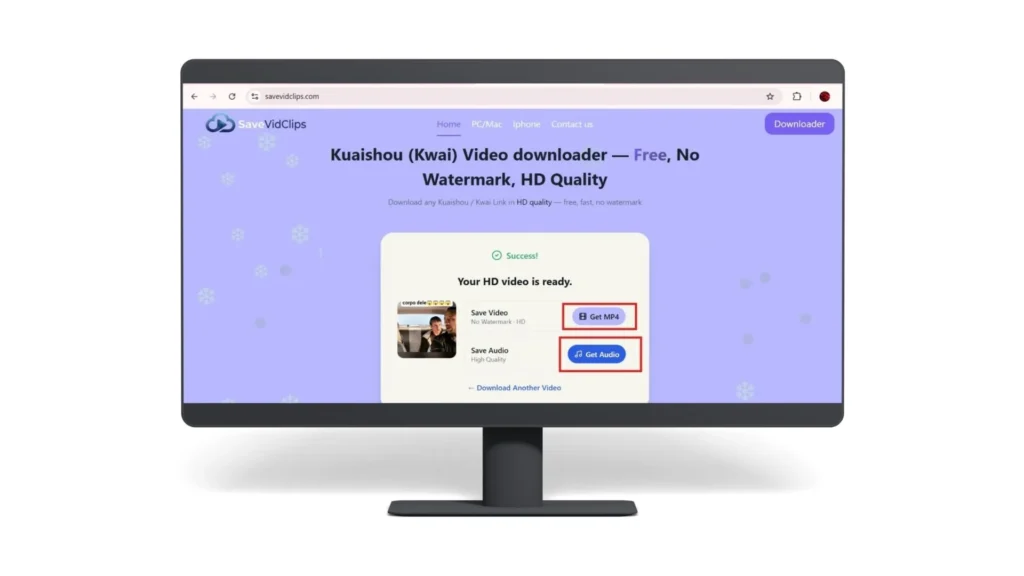
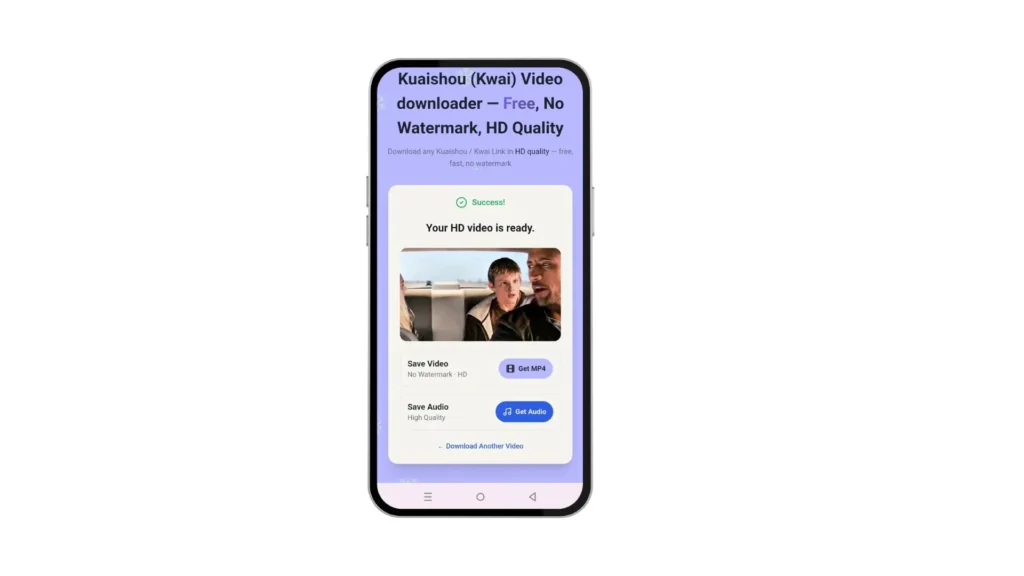
Our Kuaishou video downloader allows you to save your desired supported video by following just 3 simple steps. The simple process is explained below
How to download Kuaishou videos in HD?
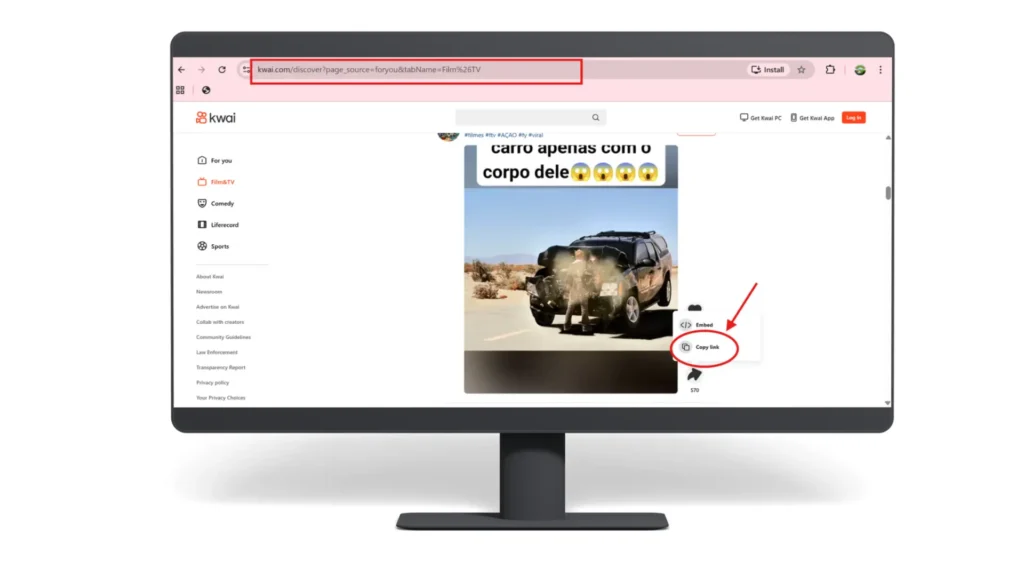
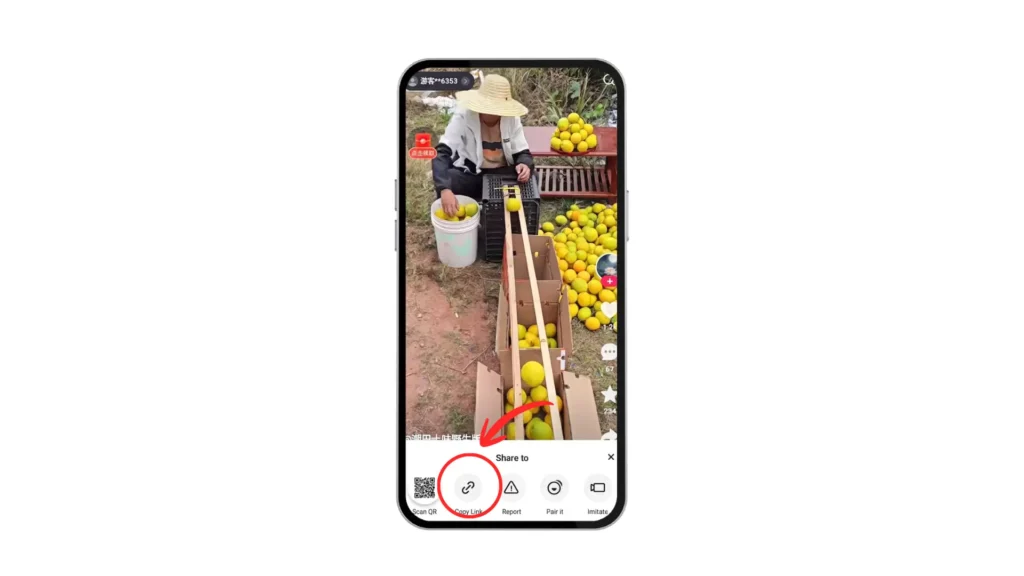
Step 1: Open your Kuaishou app on pc or mobile. Find your video and tap the share button to copy the link
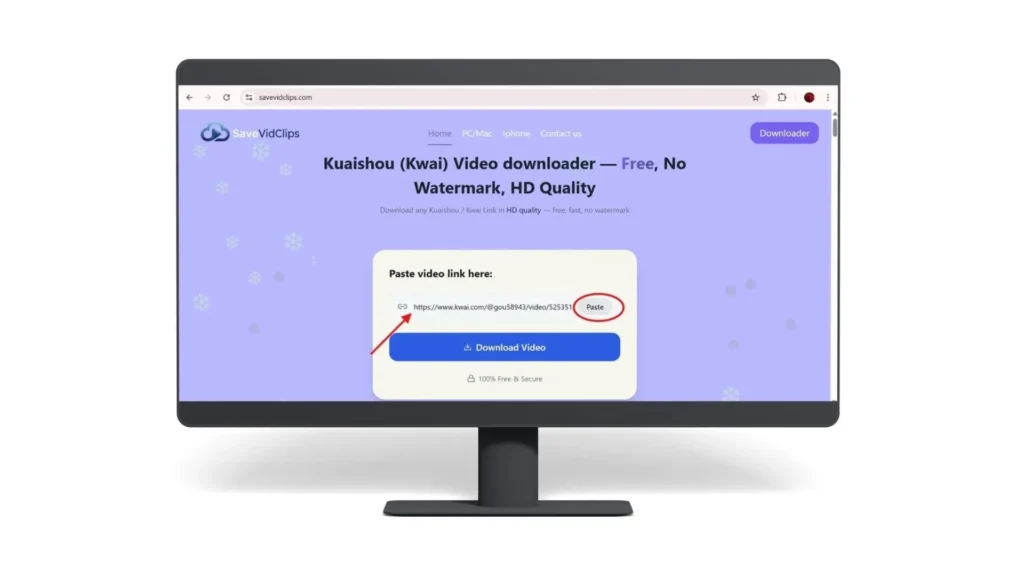
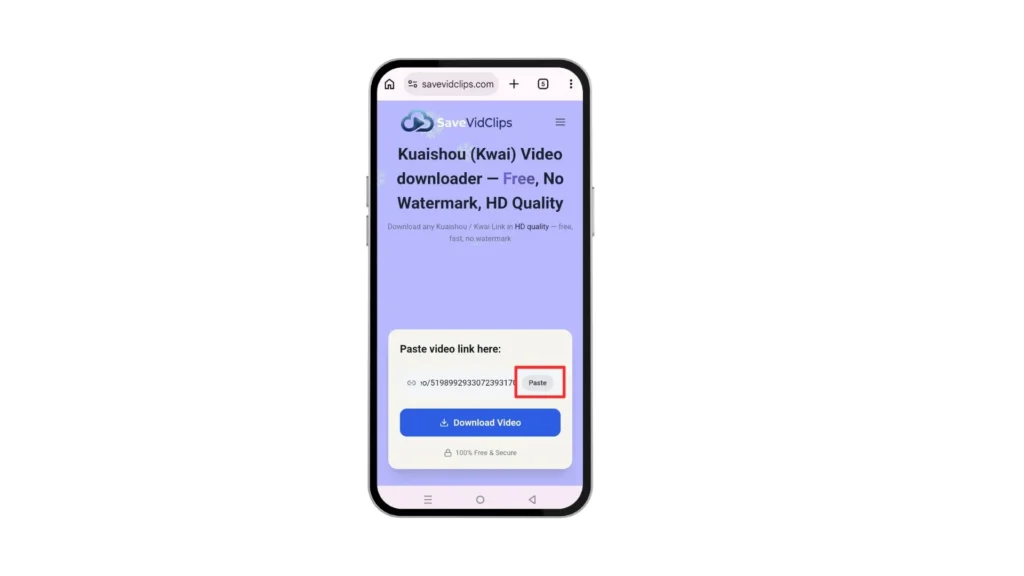
Step 2: Paste the copied link in the toolbox above
Step 3: Select the quality of your photo or video and hit the download button
Key Features
✓ No watermark — download videos in their original, clean quality
✓ HD and 4K Ultra quality support available
✓ Supports both Kwai and Kuaishou video download links.
✓ Works on all devices — Android, iPhone, and PC
✓ Download video, photos, and also get access to the Kuaishou video downloader MP3
✓ No registration required — completely free and unlimited
Supported Link Formats
Our tool is designed for a fast, trouble-free download of your link. You can paste the Kuaishou video download link from your Kwai app or browser; Kuaishou Video Downloader supports all types of link formats. Confirm that the URL is not blocked or removed from the backend. For the best results, always copy the link to the actual video rather than a profile, search-results page, or unrelated page.
Mobile App Share Links
When you open a video in the Kuaishou or Kwai app and tap the Share button, it generates short share link. These links usually look like this:
https://v.kuaishou.com/xxxxxxx
OR
https://kwaicopy.com/xxxxxxx
Our online Kwai video downloader supports these short share links. You do not need to convert or modify the link, just paste it directly and click Download.
Direct Video URLs
If you are browsing Kuaishou on a desktop browser, you need our Kuaishou video downloader for PC. Just copy the video URL directly from the address bar. These links look like this:
https://www.kuaishou.com/short-video/xxxxxxx
Paste this URL directly into our online video downloader for Kwai and Kuaishou — it works without any changes. No need to shorten or edit the link.
Kwai.com links (international)
Users outside China access Kuaishou through the Kwai app and website. These international links look like this:
https://www.kwai.com/video/xxxxxxx
Our Kuaishou video download website provides this tool, which supports both Kuaishou and Kwai links.
You do not need a separate tool for each platform.
Why Choose Kuaishou Video Downloader
The internet is crowded with different video saver tools, yet our tool is more prominent of all. Here are the core features of a good Kuaishou video downloader tool, offered by SaveVidClips.
No Watermark Download
Our Kuaishou video downloader gives a clean video, with no Kuaishou or Kwai logo imprinted on the corners. The original video file is fetched directly from the platform servers, which means you get the cleanest version available, exactly as the creator uploaded it. Many free tools leave their own branding logo, but no worries- use our Kuaishou video downloader without watermark.
Note: Watermark removal should not be treated as guaranteed for every video. If the video was uploaded with a watermark in it, no downloader tool can remove it from the video
HD and 4K quality support
Our high-quality Kuaishou video downloader tool provides you with the highest quality available for the selected video. Unlike some downloader tools that compress the downloaded video, our Kuaishou video downloader free gives you the quality that the creator uploaded. One thing to note is that no downloader tool can increase the quality of a video. If a video is uploaded in 720p, you cannot download it in 4k.
Video, Photo, and Audio MP3 support
If you just want to save a song or sound from a video, you won’t get both of them in the same place. This is where our Kuaishou video MP3 downloader comes in. Our tool supports 2 types of content. If you want video, select the MP4 option, and if you want audio, select the MP3 option. This makes our tool useful for a wider range of use cases. Visit the detailed guide on how to download Kuaishou audio and convert it to MP3.
Works On Any Device
Kuaishou video downloader online works entirely in your browser. It means there is nothing to install and no updating any app. You can simply use our tool from Chrome on Android and Safari on iPhone. For pc and Mac, both work. The interface is designed so perfectly that it automatically adjusts itself to your screen size, with no compatibility issues between operating systems or device brands.
Completely free and unlimited
SaveVidClips offers a completely free Kuaishou video downloader tool. The tool carries no download limitations or server unavailability. There are no hidden charges, no premium plans, and no download limits. You can download as many Kuaishou or Kwai videos as you want for free.
No registration required
You do not need to create an account or follow unnecessary sign-up steps to download Kuaishou videos. Downloading a simple occasional video must not require a username, password, or any other personal information.
Safe, secure, no data stored
Damaging your privacy while downloading a simple video isn’t worth it. In our Kuaishou video downloader, your privacy is fully protected. We do not store your Kuaishou video download links, your downloaded content, or any personal information. The only thing our tool needs is a good internet connection and a download link for the video.
Lightning-fast speed
Our tool fetches video from Kuaishou servers as soon as you paste the link into the URL box. However, download speed depends on certain factors, such as good internet speed, a lag-free device, and the size of the desired video. Our Kuaishou video downloader keeps the process straightforward and shows clear progress rather than leaving users wondering whether anything is happening.
Kuaishou video downloader without watermark
SaveVidClips is offering a Kuaishou Video Downloader that saves video without watermark. However, a watermark that is already embedded into the video during uploading cannot simply be removed afterward by a downloader. Users can copy the Kuaishou video URL, paste it into SaveVidClips, and check whether a clean version is available for download. This makes it useful for saving videos for personal offline viewing while preserving the original available quality.
What Is Kuaishou — And Why Is It Different From Other Platforms?
About Kuaishou
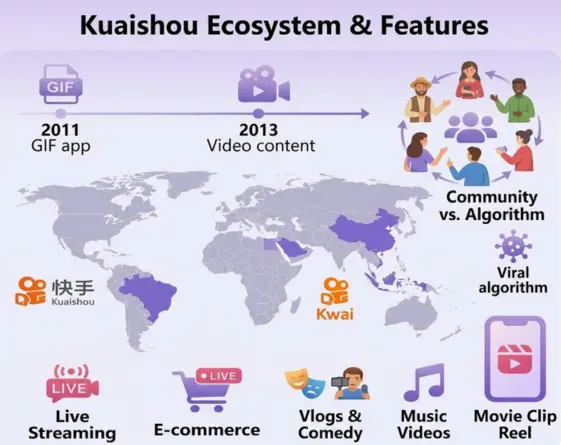
Kuaishou is a Chinese short video app founded in 2011 by Su Hua and Cheng Yixiao. It was originally launched as a GIF-sharing app, but later it shifted to video content in 2013. Today it is known by 2 names: Kuaishou in China and Kwai internationally. It is included in the list of the largest short video platforms and has 700million active users monthly.
Kuaishou’s algorithm is built around sharing everyday lives, discovering content, and showcasing talents. The platform combines several activities together, such as short-form video, live streaming, social interaction, creator ecosystem, and e-commerce. On the other hand, there are apps like TikTok that push new content to the audience, but Kuaishou helps its creators to build tight, loyal followings rather than chasing viral moments.
Kuaishou’s live-streaming feature makes it a prominent social media platform and gives it an edge. Kuaishou movie clips magnify the charm of the app, creating a layer of attractiveness among its users.
The platform is especially dominant in rural China, Southeast Asia, Brazil, and the Middle East, where Kwai has grown rapidly as a TikTok alternative. Content on Kuaishou ranges from short comedy clips and daily-life vlogs to e-commerce livestreams and music videos, all in a vertical short-form format similar to Instagram Reels and TikTok.
700Million
Monthly Users
1B+
Downloads
24/7
Monitoring
Kuaishou
VS
TikTok
Kuaishou and TikTok are often considered the same, as both are short video platforms. Kuaishou is operated by Kuaishou Technology, while TikTok is operated by ByteDance. Both of these platforms work in different ways in terms of how content spreads and who watches it. Kuaishou’s primary market is much smaller than TikTok’s global community.
Kuaishou VS Instagram
Kuaishou and Instagram are both social platforms, but they serve totally different audiences. Reels is a feature already built into an existing social network; however, Kuaishou specifically is made for short videos. In simple words, video is the main product of Kuaishou, but reel isnt main product for Instagram. Here are more differences between these 2 popular social media apps.
| Feature | Kuaishou / Kwai | Instagram Reels | |
|---|---|---|---|
✓ | Platform type | Standalone short video app Dedicated | Feature within Instagram |
✓ | Video length | Up to 1 minute (standard) | Up to 90 seconds |
✓ | Primary audience | Asia, South America, Middle East Massive reach | Global — Western markets strong |
✓ | Discovery | Community-based feed Organic | Algorithm + Explore page |
✓ | E-commerce | Strong — live selling built in Native | Growing — Instagram Shopping |
✓ | Download option | Available via third-party tools ✓ Supported | Restricted — no direct download ✗ Limited |
✓ | Content tone | Raw, authentic, community feel | Polished, aesthetic-focused |
Kuaishou Video Download Made Easy
With SaveVidClips, Kuaishou video download is simple and works directly from your browser. It is a convenient way to download Kuaishou videos for offline access while keeping the process simple and browser-based. It works across common devices, including Android phones, iPhones, tablets, and desktop computers, so users can save their favorite content without installing extra software. The service is also useful when you want to keep a video available for later viewing, especially when internet access is limited.
Is It Legal to Download Kuaishou/Kwai Videos?
This is one of the most common questions people have before using a video downloader, and it deserves an honest answer. The legality of downloading Kuaishou or Kwai videos depends on three things: what you do with the video, whether the content belongs to you or someone else, and which country you are in. In simple words, the honest answer is: it depends on what you do with the video after downloading it. But after downloading the video you if you claim it’s yours, then the problem starts. Here is the clear breakdown
Downloading for Personal Use
Downloading a publicly available video for personal offline viewing in most countries lies in a legal grey area. According to Kuaishou and Kwai’s own terms of service, creators’ permission is required to download content. One thing to clarify is that personal viewing does not mean you can repost or monetize other creators’ content. If this happens, it is surely against the terms of Kuaishou and Kwai, and there might be legal action for this. In simple words, If the video is yours or you have permission to save it, downloading it is generally straightforward. If it belongs to someone else, check the creator’s permissions and the applicable copyright rules before using the copy.
Reposting or Commercial Use — What the Law Says
This is where legal risk becomes real. If you take someone else’s video and post it without permission or giving credit to the official creator, you fall in the red area. The US Digital Millennium Copyright Act (DMCA) declares the video as the intellectual property of its creator. The safest method is to approach the creator and ask for permission. Many creators are open to it, especially if you credit them properly.
Your Privacy and Security — We Do Not Store Your Data
The process of using our Kuaishou video downloader is simple, as we do not demand you personal data. All you do is copy the link, paste in our toolbox, and download it. Kuaishou video downloader fetches the video directly from the Kuaishou server. That’s all, because we don’t even store your link data or download history. No account means no data — it is that simple. Kuaishou video download has no login system, no tracking cookies tied to your identity, and no third-party data sharing.
Kuaishou Video Downloader Not Working? Quick Fixes
If your Kuaishou Video Downloader is not working, that does not mean the tool is broken. The reason could be any of the following: an incomplete Kuaishou video download link, a browser issue, a temporary connection problem, or a video that is not available for external downloading. Try these quick fixes first. For more detailed solutions, see our complete Kuaishou downloader troubleshooting guide.
Why Isn’t My Kuaishou Link Working?
Why It Happens
If a Kuaishou link is not working, the problem is usually in the link itself, or other reasons include the availability of the original video or a temporary connection issue. A link also stops working if the video is deleted, made private, or restricted. Also, check where you copied the link from, because for Kuaishou video download, SaveVidClips needs the direct share link, not a general browser URL, as it may not work sometimes.
How to Fix It
Open the original video in the Kuaishou or Kwai app and generate a fresh URL. You can do this by tapping the Share icon and then clicking on Copy Link. Paste that new link into the Kuaishou Video Downloader and try again. If it still doesn’t work, refresh the downloader, check your internet connection, and try an updated browser. If the original video is private, deleted, restricted, or downloading has been disabled by the creator, the link may not be downloadable.
Why Is My Download Stuck or Not Starting?
Why It Happens
A slow or unstable internet connection is one of the major causes of failed downloads. Other reasons include heavy server traffic, a large video file, an expired link, or a problem with the original video source. Often, some extensions like ad blockers and VPNs also prevent the smooth downloading process of our free Kuaishou video downloader tool online without watermark.
How to Fix It
First, refresh SaveVidClips and enter the URL again. This time, make sure your internet connection is stable, and you have enough free storage to save the video file. Also check that no ad blocker extensions or VPNs are running in the background. Ig the download is still stuck after 30-60 seconds, try a different browser (Chrome or Safari work most reliably with SaveVidClips)
Copyright Rules by Country
Pakistan:
Pakistan’s copyright law under the Copyright Ordinance 1962 protects original creative works, including videos. Downloading for personal use is generally tolerated, but redistribution or commercial use of copyrighted content without permission is a punishable offense.
India:
Under the Copyright Act 1957, downloading copyrighted video content without permission is technically illegal even for personal use. However, enforcement is primarily focused on large-scale distribution and commercial misuse rather than individual personal downloads.
United States:
US copyright law under the DMCA is among the strictest. Downloading copyrighted content without permission is illegal, regardless of personal use intent. However, downloading your own content or content that is licensed under Creative Commons is fully permitted.
How to Download the Kuaishou and Kwai App
If you do not have the Kuaishou or Kwai app installed yet, you can download the latest version APK from our website. We have a complete guide covering the Kuaishou and Kwai app — including setup, account creation, and how to find videos worth downloading.

Got questions?