

How to Download Kuaishou Videos on PC/Laptop (Complete Guide)
KEY Takeaways
- You can download Kuaishou (KS) videos on PC using free online tools, browser extensions, or desktop software.
- The easiest method is using a browser-based downloader like SaveVidClips.com — no software installation required.
- Always download videos for personal, offline use and respect content creator rights.
- Kuaishou video URLs can be copied directly from the app or web browser for use in any downloader.
- High-quality downloads (HD/1080p) are possible with the right tool.
What Is Kuaishou and Why Do People Want to Download Its Videos?
Kuaishou — known in China as 快手 (Kuài Shǒu), meaning “Fast Hands” — is one of the world’s largest short-video platforms. With over 700 million registered users and more than 300 million daily active users, it rivals TikTok and Douyin in popularity, particularly across China, Southeast Asia, and parts of Latin America and the Middle East.
The platform hosts everything: cooking tutorials, travel vlogs, comedy sketches, music performances, local news clips, and live-stream recordings. It is owned by Kuaishou Technology, a Beijing-based company that went public on the Hong Kong Stock Exchange in February 2021.
So why do people want to download Kuaishou videos to their PC or laptop? The reasons are pretty straightforward:
Watching content offline without needing mobile data
Saving educational or tutorial videos for later reference
Archiving a creator’s content before it gets deleted
Editing or repurposing content for personal projects
Sharing a video with someone who does not have the app
Whatever your reason, this guide will show you exactly how to do it — step by step, using free and reliable tools.
Can You Download Kuaishou Videos Directly from the App?
Yes and no. Kuaishou’s mobile app does allow users to save some videos directly to their phone’s gallery, but this feature is controlled by the content creator. If the creator has disabled downloads, the save button will not appear.
On PC or laptop, there is no official desktop app for Kuaishou in most countries outside China. The web version at kuaishou.com lets you watch videos, but there is no built-in download button. This is exactly why third-party tools exist — and they work remarkably well.
How to Download Kuaishou Videos on PC: 2 Reliable Methods
| Method | Skill Level | Speed | Requires Install? | Best For |
|---|---|---|---|---|
| Online Downloader ( SaveVidClips ) | Beginner | Fast | No | Quick, one-time downloads |
| Browser Extension | Intermediate | Very Fast | Yes | Frequent downloaders |
Method 1: Use an Online Kuaishou Video Downloader (Easiest)
This is the most beginner-friendly approach and requires zero technical knowledge. Tools like savevidclips are built precisely for this.
Step-by-Step Instructions:
Open your browser on PC and go to kuaishou.com. Browse or search for the video. If you found the video on the Kuaishou mobile app, tap the Share button and select Copy Link.
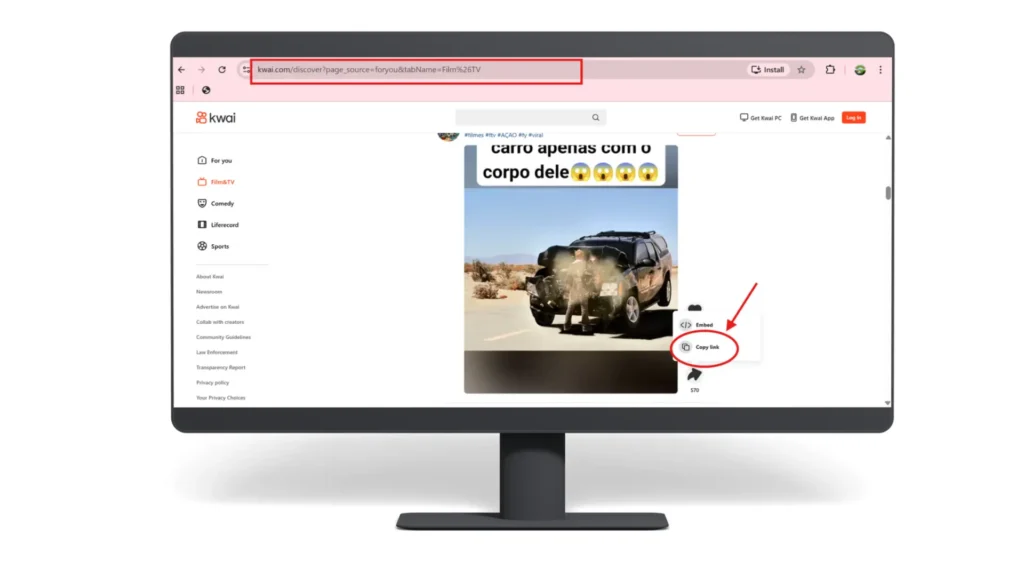
On PC, look at the address bar. The URL will look something like: https://www.kuaishou.com/short-video/3xxxxxxxxxxx
Select the full URL and copy it (Ctrl+C on Windows / Cmd+C on Mac).
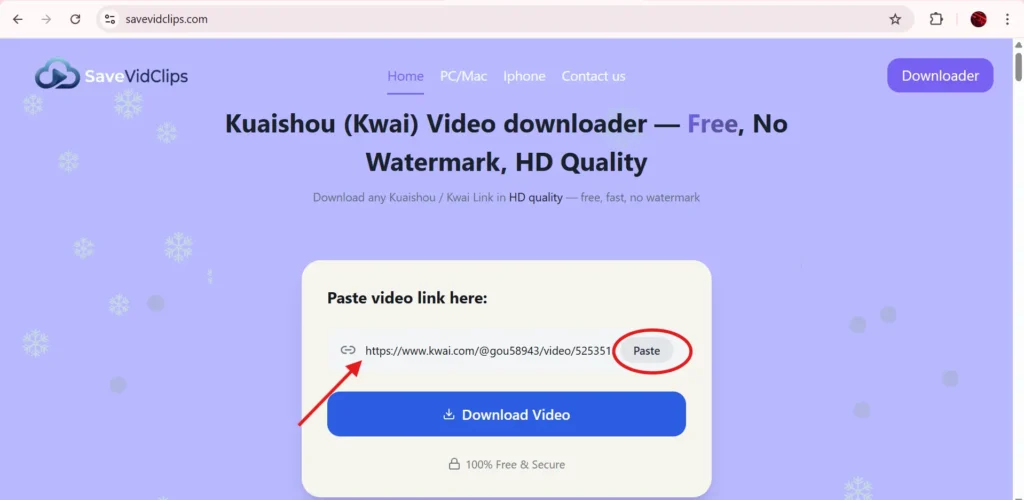
Open a new browser tab and visit SaveVidClips.com. You will see a clean input field on the homepage.
Paste your copied Kuaishou video URL into the input box (Ctrl+V) and click the Download button. The tool will process the link within a few seconds.
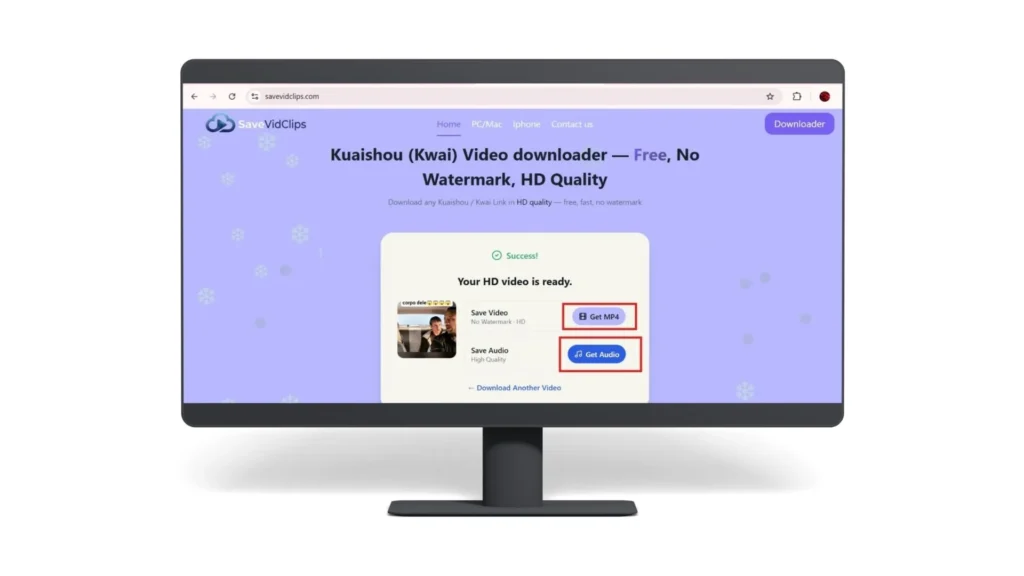
Once the download options appear, select your preferred quality — typically 720p or 1080p HD. Click Download next to your chosen format. The video file will save to your PC’s default Downloads folder as an MP4 file.
Method 2: Use a Browser Extension (Easiest)
If you regularly download Kuaishou videos on PC, a browser extension saves time by adding a download button directly to the video page. The extension works in the background and can detect video streams on nearly any platform, not just Kuaishou. Visit the detailed guide on How to download Kuaishou audio and convert to MP3
Popular options include:
——Stream Video Downloader (Chrome)
——Video DownloadHelper (available for Chrome and Firefox)
——Downloady (Chrome)
How to set it up:
How to Get the Kuaishou Video URL on PC
Simply copy the URL from your browser’s address bar while the video is playing.
- Open the video in the app
- Tap the Share icon
- Tap Copy Link
- Paste it into your PC browser or downloader tool
The process is identical — tap Share, then Copy Link.
What Video Formats and Quality Can You Expect?
Is It Legal to Download Kuaishou Videos?
This is a fair question and deserves a clear answer. Downloading Kuaishou videos for personal, offline viewing is generally considered acceptable in most countries, similar to how recording a TV broadcast for personal use has historically been treated.
However, there are important boundaries to respect:
- Do not re-upload someone else’s video and claim it as your own
- Do not use downloaded videos commercially without the creator’s permission
- Do not strip watermarks and redistribute content
- Kuaishou’s own Terms of Service prohibit scraping or downloading content through unauthorized means for commercial or redistribution purposes
When in doubt, reach out to the original creator for permission. Respecting content creators builds a better internet for everyone.
My Tips for a Better Kuaishou Download Experience on PC
My Tips for a
Better Kuaishou
Download Experience
on PC
Conclusion
Downloading Kuaishou videos on your PC or laptop is easier than most people think. Whether you prefer a quick one-step solution through an online tool like SaveVidClips.com, the convenience of a browser extension, or the power and flexibility of desktop software, there is an option that fits your workflow perfectly.
The key steps are simple: copy the video URL, paste it into your preferred downloader, choose your quality, and save. That is genuinely all it takes.
Just remember to use downloaded content responsibly — respect creators, do not redistribute without permission, and keep personal enjoyment as the primary purpose.
Ready to save your first Kuaishou video? Head over to SaveVidClips.com right now — no sign-up required, completely free, and it works in seconds.
Frequently Asked Questions